

If you want to grow your real estate business, adding data visualization boosts customer experience (CX). When house buyers see cold facts laid out on a sheet of paper, it can feel overwhelming. A clear chart can help readers compare interest rates, prices and costs. Show the inputs, source and date so the visual supports a decision rather than manufacturing pressure to buy now.
Between showing properties and the paperwork for offers, finding time for marketing is tough. Fortunately, data visualization is fairly painless with today’s artificial intelligence (AI) tools that can generate a data-based graph in seconds.

Benefits of Using Data Visualization in Real Estate
Market conditions differ by place and time. Use a defined geography and reporting period, distinguish median from average prices, and avoid claiming one statistic caused another without evidence.
- Help readers compare property features and costs.
- Use clear photographs or virtual tours alongside sourced data.
- Show both benefits and limitations of the available choices.
A visualization supports understanding; it does not guarantee a sale or establish that everyone should buy immediately.
How to Use Visuals to Boost Your Success
If visuals are the thing missing from your real estate marketing efforts, you’ll find many ways to implement them in the strategies you already use to attract new clients. Visual data is an essential way to show potential buyers the pros and cons of different properties they’re considering buying. AI can generate a graph of the must-haves on their list and compare those with the details of the houses they’ve viewed.
Compare properties against the features and priorities the client has actually stated, rather than assuming preferences from age, marital status or family composition.
A comparison can show the extra bedroom a client requested, distance to a destination they named, or total costs under stated assumptions. Let the client decide which tradeoffs fit their plans.
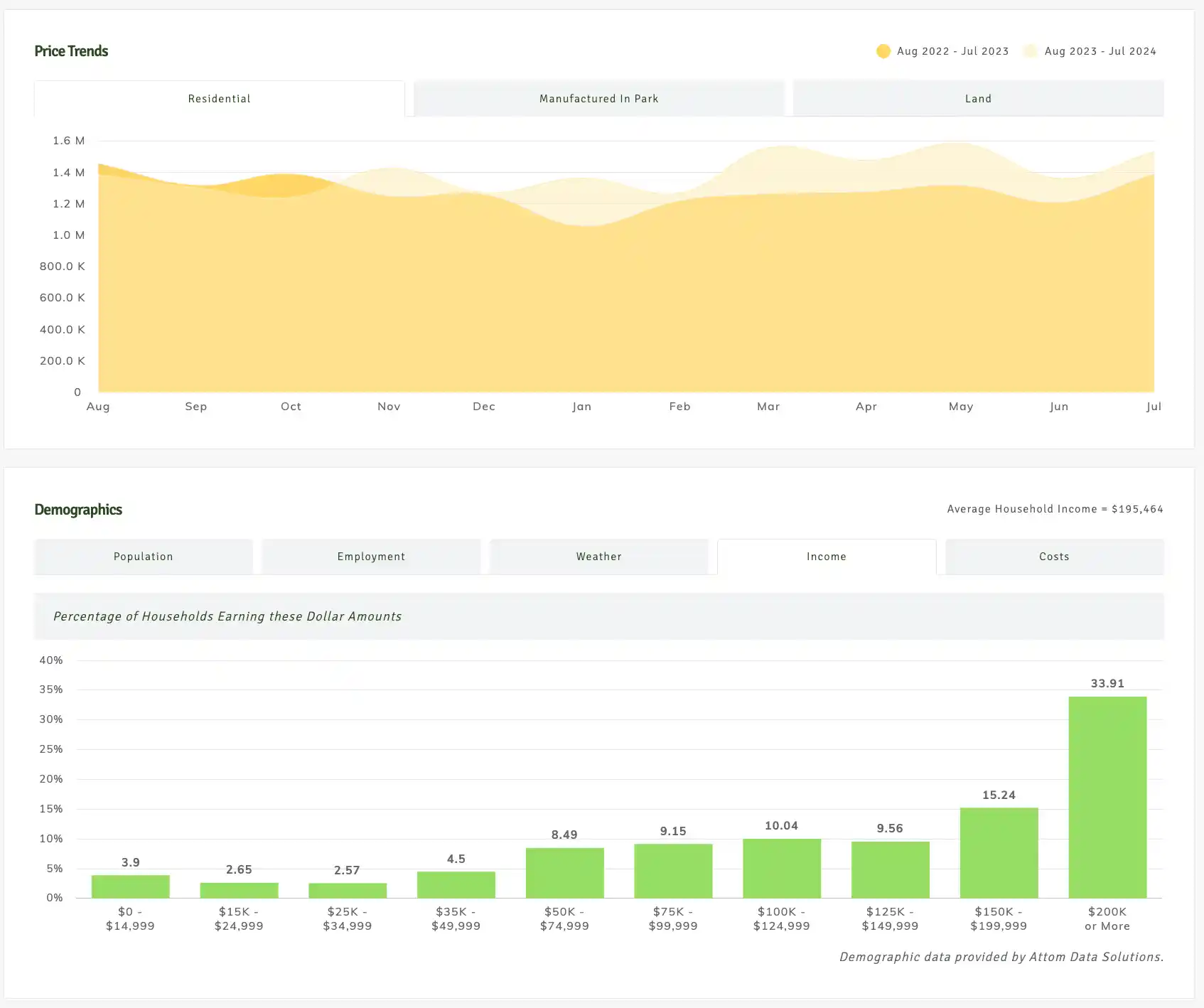
Historical 2024 Redmond example; use a current report for today’s market.
Which Visual Data Should Agents Highlight?
The types of real estate data you can turn into visualizations include but aren’t limited to:
- Location: Highlight the neighborhood, schools and nearby amenities.
- Property characteristics: Include the number of bedrooms and bathrooms, space, yard, attached or detached garages, and special features.
- Price and sales comparisons: Show the listing price and selling price of similar homes in the neighborhood, number of days on market, and special offers such as a flooring allowance.
- Area context: Present factual access, amenities and sourced density information without suggesting who belongs in a neighborhood.
- Real estate market trends: Buyers must know the average sales price for homes in the city, how many homes meet their needs are available and interest rate trends.
- Mortgage comparisons: Compare loan options using current lender information. Eligibility, down payment, mortgage insurance and fees vary; show the assumptions and have the lender confirm the figures.
Charts are a starting point to educate home buyers and initiate in-depth discussions about topics such as debt to income ratio, savings, true costs of home ownership and fixing your credit score.
Renting and buying: compare the full picture
Compare deposits and moving costs with a down payment, closing costs and cash reserves.
Compare rent and renters insurance with mortgage payments, taxes, insurance, maintenance and any HOA fees.
Consider the expected time in the home, lease terms, moving needs and potential selling costs.
Label interest-rate, rent, resale-price and appreciation assumptions. Equity gains are not guaranteed.
Use current local inputs rather than a universal “buying always wins” figure. CFPB homebuying-cost guidance is a starting point for the cost categories; ask qualified advisers about loan and tax details.
Possible Visual Data Formats
You’ll need different types of visuals for various uses. When it comes to visual data, tap into the power of simplifying hard facts, have a little fun or share details. Here are some of the types of visual data formats you might use and why.
Infographics
Use an infographic to explain a process, a comparison or several related facts. For example, show the steps in buying a home or compare renting and owning with dated local inputs. State assumptions and avoid promising future appreciation or guaranteed equity.
Share smaller extracts when they remain accurate outside the full graphic, and keep the source and date with each extract.
Graphs
Use graphs to compare consistent measures over a defined period. Show units, sources and the reporting date, and avoid truncated axes or selective periods that exaggerate a trend.
You can also graph your own sales-process activity to investigate bottlenecks. A chart should explain the evidence, not invent urgency.
Pie Charts
Use a pie chart only for categories that make up a meaningful whole, such as the share of inquiries by source. Include the period and sample size. A bar chart may be easier when readers need to compare similar values.
Do not use protected characteristics to direct housing choices or ad targeting. Use clients’ stated needs and your service activity to understand which explanations are useful.
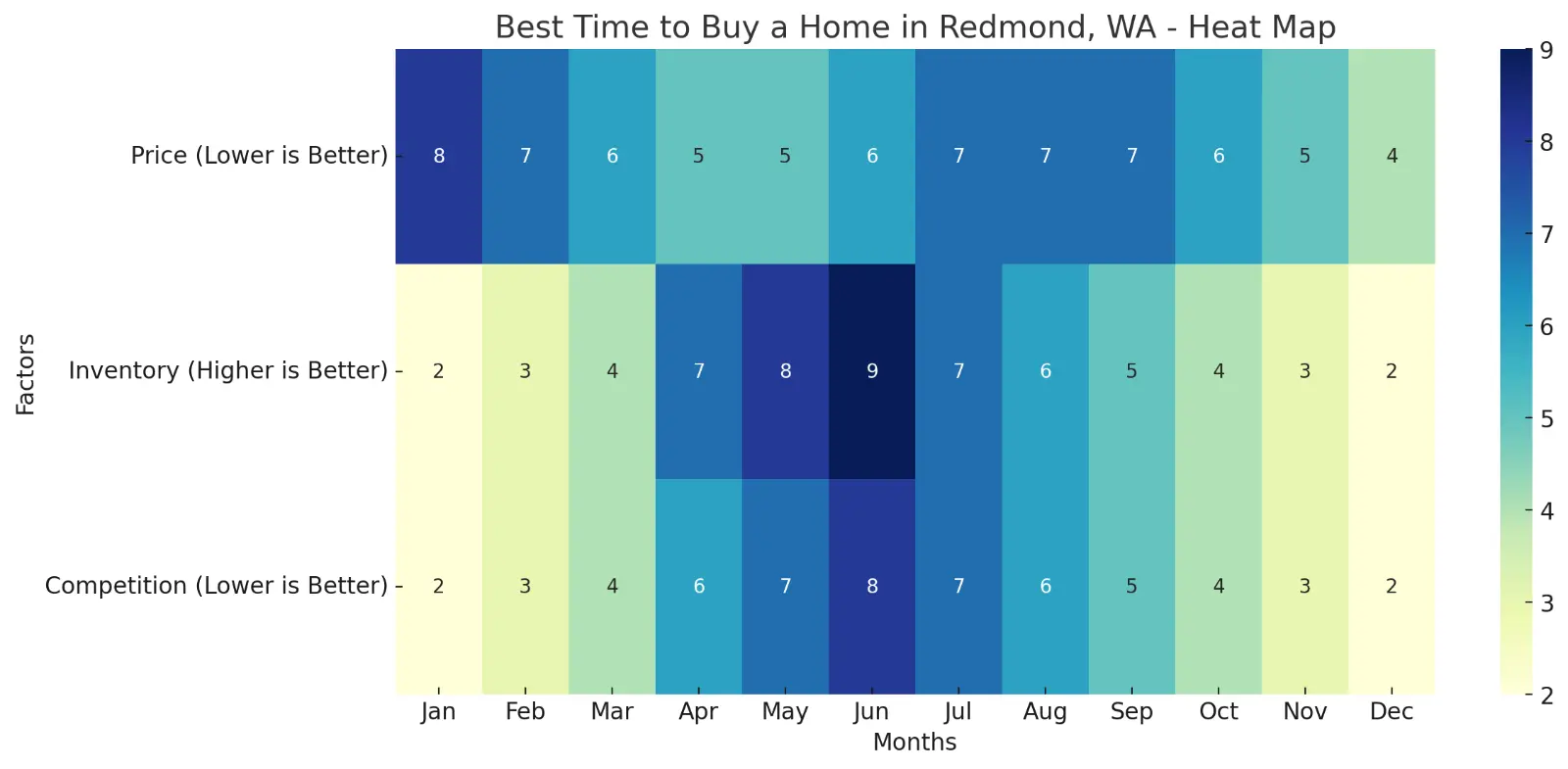
Heat Map
One useful way to show population density to potential clients is through a heat map. If someone wants to live in a thriving metropolitan area, they’ll want to see plenty of others to interact with. A client who seeks quiet, country living will want a low-density heat map.
You can also use the maps to figure out your best marketing methods in various areas. If your listings fall in a particular school district, you may want to include an ad at the local theater, in the high school newspaper or on menus at various area restaurants families frequent.
Venn Diagram
Help buyers analyze the most important aspects of their property searches. For example, where do location, property size and budget requirements overlap? You can narrow your search and ensure you’re meeting your buyers’ needs.
You can also use Venns to expand your networking efforts and reach new clients. Each circle shows groups of people you’re connected to and how they might expand and connect you to new groups and audiences.
Programs to Create the Visual Data
One way to save time is to grab some pre-made, royalty-free real estate infographics and share them via your website, newsletter and social media. You could take some graphic design courses, but it may be easier to either hire someone from a job gig site such as UpWork or Fiverr, or purchase templates already made.
If you want some simple software you can use without coding knowledge, try:
- Canva: Comes with graphics, photos and templates
- Excel: Put in the data and go to Insert/Charts and choose the type of data visualization you desire, such as a bar chart
- GraphmakerAI: Make a chart with prompts and computer help
- Tableau: Drag and drop tool but you will need to study the right way to format calculations
There are many different tools available. It’s crucial to find one you feel comfortable using and that provides the visualizations you need to market to your clients.

Where to Use Visual Data
Once you’ve created some valuable visualizations, the next trick to improving your marketing efforts is to know where and how to use the material.
Social Media & Your Website
If you have a website or an agent page as part of a larger agency, you should include general details to generate interest and discussions. You can use charts to educate potential clients and make sure they are ready to buy before they contact you. Include an infographic with percentages or ranges in areas such as salary, savings and credit score.
Some of the places you can add an infographic and engage with users include sites like Facebook and Instagram. You can also create a video with different graphics and commentary and upload to YouTube, TikTok and Facebook Reels.
Newsletters
If you don’t yet have a newsletter, it is one of the top ways to stay in touch with your customers. Those who’ve previously bought or sold a home through you may move again in a few years, becoming clients a second time. If they receive a weekly or monthly email from you with tips and advice, they’re likely to remember your name when they’re ready to dip their toes back into the real estate pool or to share your information with others in the market for a house.
Infographics add interest and detail to articles you post in your newsletter. You can pull out micro sections from a larger infographic to prove a point and back it up with relevant images.
Printed Materials
Bring a readable comparison to a client meeting, with the date, sources and assumptions printed alongside it. Explain the measures, invite questions and provide the underlying figures when useful.
Gain an Edge
Anything you can do to stand out from other agents in your area will drive your marketing success. You can only sell more homes if you attract more clients, so strive to get your name out there and become an authority in your niche. The more data you can provide, the clearer it is that you do your homework and know the markets.
Frequently Asked Questions About Data Visualization
What is data visualization in real estate marketing?
Data visualization is taking complex real estate data—market trends, property values, buyer demographics— and turning it into charts, graphs and infographics so clients can make decisions fast.
How can data visualization help me sell homes faster?
A clear chart can help clients understand market data, property features and costs. It does not guarantee a faster sale or prove that making an offer now is the right decision.
Do I need to be tech savvy to create visual data for my listings?
Nope! There are plenty of user friendly tools like Canva or GraphmakerAI where you can create amazing visuals without any tech background. Plus many platforms have templates so you can just plug in your data and go.
What types of visuals are most effective in real estate marketing?
The most effective visuals are the ones that answer your client’s questions. For example, heat maps are great for showing population density, pie charts for categories that make up a whole, such as inquiry sources. The key is to match the visual to the message you want to convey.
Is visual storytelling the same as data visualization?
Not exactly. Data visualization is about presenting information through visuals like charts and graphs. Visual storytelling goes a step further, using those visuals to create a narrative that engages and resonates with your audience on an emotional level.
Can data visualization be used in both digital and print marketing?
Yes! While digital platforms like your website or social media are perfect for sharing dynamic visuals, print materials can benefit too. Imagine handing a client a personalized chart during a meeting—it’s a powerful way to communicate value face to face.
How often should I update my visual data?
Real estate markets change fast, so it’s good to update your visuals regularly—at least once a quarter or whenever there’s a big market shift. Keeping your data current means you’re always providing the most up to date information to your clients.
Is data visualization only for tech savvy buyers?
Nope. Data visualization actually levels the playing field by making complex information accessible to everyone, regardless of their tech skills. It’s all about presenting information in a way that’s easy to understand, no matter who’s looking at it.
- Market report compliments of Green Ocean Real Estate Services, using the IDX Broker platform from Elm Street Technologies